
Redmine vs RedmineUP: A Breakdown
 If you’re on the market for a project management tool, you’ve likely heard of Redmine. It’s been around for some time now, and for good reason. Teams work with it because it’s reliable, customizable, and free. For those who are looking for a little bit more, there’s RedmineUP. Think of it as Redmine, but upgraded. It comes with extra features, premium plugins, and a cleaner interface. Same foundation, just more built-out.
So, which one should you pick? Let’s break it down.
What Redmine Offers
Redmine is built on Ruby on Rails and is best known for issue tracking. That’s where most people start. But it’s more than that, you can manage multiple projects, track time, set up workflows, and even link it with Git or SVN. The big appeal is flexibility. You can shape it to fit almost any workflow. The catch is that it’s not plug-and-play. Someone on your team needs to handle setup and maintenance. Here’s what you get right out of the box:
- Issue and task tracking
- Gantt charts and calendars
- Time logging
- Role-based permissions
- Custom workflows and fields
- Version control integrations
- Multi-language support
What RedmineUP Brings
If Redmine is a basic toolbox, RedmineUP is a fully stocked workshop. It bundles in premium plugins so you don’t have to hunt for community add-ons. It also looks nicer. The interface is modern and easier for teams who don’t want to wrestle with clunky menus. Some of the key additions:
- Advanced Gantt charts and resource planning
- Agile boards for Scrum and Kanban
- CRM and helpdesk tools
- Time tracking with billing options
- Project templates and custom dashboards
- Detailed reporting and analytics
- Direct access to professional support
RedmineUP saves time, reduces headaches, and just feels more polished. Use this coupon code for RedmineUP to get a 20% discount on all orders.
Redmine vs RedmineUP at a Glance
| Feature | Redmine | RedmineUP |
|---|---|---|
| User Experience | Functional but dated | Modern, simple, easier for new users |
| Features | Basic issues, Gantt, time tracking | Agile boards, billing, CRM, dashboards |
| Customization | Flexible but needs tech skills | Easier to tweak without coding |
| Support | Community forums, slower | Paid support, faster response |
| Cost | Free (setup takes effort) | Paid (includes plugins and support) |
| Integrations | Community plugins | Same plus maintained premium add-ons |
When to Use Redmine
- Your team is small or budget-conscious
- You’re fine with DIY setup and maintenance
- You have technical skills on the team
When to Use RedmineUP
- Your team is growing and projects are more complex
- You want features like Agile boards, billing, or dashboards immediately
- You’d rather have professional support than rely on forums
- A modern interface is important for adoption
Bottom Line
Both tools are solid, but they serve different needs. Redmine is free, flexible, and DIY-friendly. RedmineUP is polished, feature-rich, and supported. It’s not about which one is “better.” It’s about which one fits your team and how you work.
An Introduction to Markzware in 2025
Founded in 1992, and based in Nevada USA, Markzware is the producer of a number of high-end file conversion software products. Renowned for being a company that values user feedback – their product line has been carefully engineered to meet – and in many cases exceed – user requirements. Quality file conversion tools such as Q2ID (now QXPMarkz), save time by enabling users to convert QuarkXPress docs in Adobe InDesign without having to recreate them from scratch. At the time of writing, Markzware’s current offerings are:
- FlightCheck
- QXPMarkz
- IDMarkz
- PDFMarkz
- OmniMarkz
What is FlightCheck?
Use Flightcheck to thoroughly inspect and analyze images, fonts, colors, and more in multiple desktop publishing file formats with this next-generation, preflight quality control tool for MacOS. What’s more, FlightCheck is a standalone application and as such does not require any external apps for the software to function. Customize preflight reporting with company info and logo and then export as HTML, TXT, RTF, XML, or JSON, into automated workflows. For a limited time only use this Markzware Discount and save up to 20% on FlightCheck and other Markzware software.
What is QXPMarkz?
Convert QuarkXPress files to IDML and open them in Adobe InDesign, QuarkXPress, Affinity Publisher, and others with QXPMarkz. Like FlightCheck, QXPMarkz is a standalone application and does not need any additional applications to run it. Use the software to export QXP files into a number of formats such as PDF, TIFF, PNG. JPEG, GIF, and IDML. QXPMarkz SE is the Windows version of the software that sports the same functionality as QXPMarkz, the MacOS version.
What is IDMarkz?
IDMarkz can be used to convert InDesign via CS4 to a wide range of file formats. Preview InDesign in rapid fashion without the need for a fully-fledged editor, and export your InDesign files to PDF using IDMarkz. Add markups, comments, and annotations in Adobe Acrobat and import the edits back into InDesign. The software is also available in Windows format under the name IDMarkz SE.
What is PDFMarkz?
PDFMarkz is a PDF preview/conversion powerhouse that enables users to both preview, and convert PDFs into a multitude of formats. Open and edit PDFs in InDesign, Affinity Publisher, QuarkXPress, and more. Automation options facilitate fast workflows, and support for AppleScript and Custom URL Schemes ensures that PDFMarkz will integrate seamlessly with your workflow of choice. PDFMarkz SE is the Windows variant of the software.
OmniMarkz – Markzware all-in-one solution
OmniMarkz is the brand’s all-in-one solution which powerfully combines QXPMarkz, IDMarkz, and PDFMarkz into one package. Preview, report, and convert QXP, InDesign, and PDFs in one application. OmniMarkz SE is also available for Windows users.
Bitdefender GravityZone Business Security vs Premium: A Breakdown in 2025
A key question that often arises among those whom are interested in Bitdefender’s premium business solutions is: What is the difference between Bitdefender GravityZone Business Security Standard and Premium version? In this post we will take a look at the key differences between the two offerings. To do that effectively, we will examine the main features of the two products.
The Growing Need for SMB Cybersecurity
Let’s be honest — most small business owners didn’t start their companies thinking about hackers or malware. They were focused on growth, customers, payroll, and keeping the lights on. But over the past few years, that quiet sense of “we’re too small to be noticed” has turned into one of the biggest misconceptions in business.
Cybercriminals have learned that smaller companies are often the easiest to break into. They don’t need the complexity of a corporate breach when a mom-and-pop accounting firm, a local retailer, or a 25-person agency might be sitting on valuable client data — and often with fewer defenses in place.
Recent studies show that nearly half of all cyberattacks now hit small and medium-sized businesses. Even worse, most of those companies don’t have a response plan. A ransomware attack can lock down files in minutes and cost thousands just to recover. For some businesses, that’s the difference between surviving the quarter or shutting down entirely.
Bitdefender GravityZone in 2025

See the table below to see a full breakdown of the features on offer from both versions. We will also delve deeper into the additional features of the Premium version later on in the post.
| Feature | Standard | Premium |
|---|---|---|
| Target Audience | Small to medium businesses (SMBs) | Mid-sized to larger businesses or enterprises |
| Core Protection | Antivirus, Anti-malware, Ransomware Protection | All Core Protection + Advanced Features |
| Endpoint Protection | Yes (covers multiple devices) | Yes (covers multiple devices) |
| Firewall Protection | Yes | Yes |
| Web Filtering | Yes | Yes |
| Advanced Threat Defense | Yes | Yes |
| Behavioral Analysis | Yes | Yes |
| Advanced Anti-Exploitation | Yes | Yes |
| Device Control | Yes | Yes |
| Data Protection | No | Yes (Includes encryption tools) |
| Full Disk Encryption | Available as add-on | Available as add-on |
| Network Attack Defense | Yes | Yes |
| Security Information and Event Management (SIEM) | No | Yes (logging and monitoring integration) |
| Cloud Sandbox | No | Yes (detects new threats via sandboxing) |
| Vulnerability Assessment | No | Yes (advanced scanning and patch management) |
| Endpoint Detection and Response (EDR) | No | Yes (limited) |
| Mobile Device Management (MDM) | Available as add-on | Available as add-on |
| Multi-Layer Ransomware Protection | Yes | Yes (with added threat intelligence) |
| Priority Support | Standard Support | Premium Support (24/7 with dedicated experts) |
| License | Per Endpoint/Device | Per Endpoint/Device (with additional premium features) |
| Pricing | $189.99 (5 Devices) | $409.99 (5 Devices) |
| Datasheet | Download | Download |
Key Differences with Premium
1. Advanced features
The Premium version offers advanced features such as HyperDetect, Cloud Sandbox, Vulnerability Assessment, and SIEM integration, which can be best utilized by larger businesses.
2. Support
The Premium version gives users access to 24/7 priority support, with a dedicated actuary ensuring faster response time from dedicated experts – ideal for medium, larger or more complex businesses. This is critical for businesses in scenarios where any kind of downtime could cause harm to both finances and reputation.
3. Data Protection
The Premium version of GravityZone will allow you to have Data Encryption, Mobile Device Management (MDM), and additional advanced protections for your sensitive data/information that are not provided by the Business Security version. This is essential if your business handles sensitive information on clients such as finance and health care records.
4. Advanced Threat Prevention
The Premium version of GravityZone will also give you better protection against more sophisticated network attacks, giving you full visibility into your companies threat landscape, and offer SIEM integration.
5. Pricing
- Business Security (Standard): $189.99 (5 devices). This is best for SMBs.
- Premium: $409.99 (5 devices). This is best for mid-sized to large businesses, and enterprises.
- For a limited time only, use this Bitdefender GravityZone Business Security Coupon and get 50% off both versions.
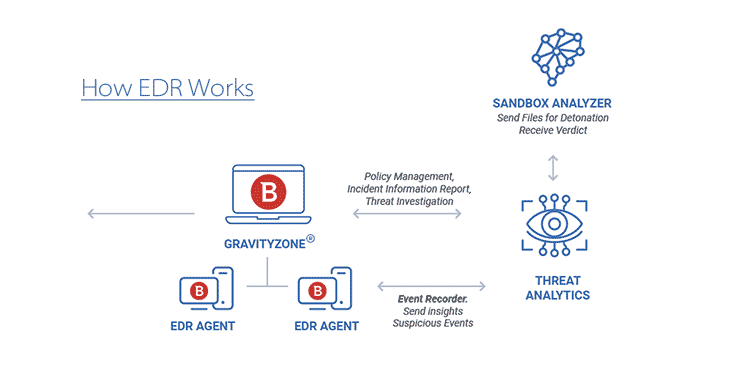
EDR effectively stops cybercriminals in their tracks by utilizing intelligent containment technologies
Additional Features of Bitdefender GravityZone Business Security Premium
As has been highlighted in the comparison above, the Premium version comes with some interesting additional features which may well prove decisive when it comes to making a choice between the two offerings. In the following passage we’ll take a closer, in-depth look at some of those features.
Endpoint Detection and Response
Bitdefender’s latest Endpoint Detection and Response (EDR) is a game-changer in the world of cybersecurity. It efficaciously intercepts ransomware with seamless cross-endpoint prevention, detection and response. According to Bitdefender, it is the only EDR in the world which correlates attacks over endpoints thereby enabling users to consolidate and address incidents in a much faster way. Powered by class-leading AI technology, GravityZone Premium invariably ranks highly in independent testing.
Full Disk Encryption
This feature ensures that all data is securely encrypted using Bitdefender’s highly secure encryption protocol. A native encryption solution, it secures hard drives on endpoints to safeguard sensitive data from theft or accidental loss. Easy to operate, users can encrypt, decrypt boot and non-boot volumes in a matter of clicks. Learn more about Full Disk Encryption.
Mobile Device Management
The ability to organize and oversee all of your corporate mobile devices is made easy with the GravityZone Control Center. Take control of your devices and enforce company security policies via enterprise-level management of iPhone, iPad, and Android devices connected to a corporate network. What’s more, smart anti-theft technology makes it simple to locate, lock, and wipe lost devices remotely.
Microsoft® Exchange
Bitdefender GravityZone’s Security for Exchange provides award-winning antispam, antimalware protection for mail servers. It safeguards and secures your Microsoft Exchange environment from both internal and external threats. The winner of Virus Bulletin’s Golden SPAM+ Award on multiple occasions, the product continually ranks high in VBSpam’s quarterly email security comparative reviews. Without question, it’s an advanced, well-engineered, technologically proven platform.
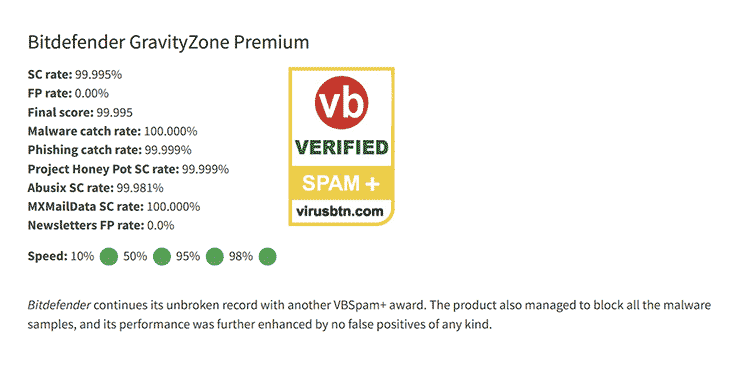
BGZBSP consistently outshines the competition in Virus Bulletin’s quarterly tests
Smart Centralised Scanning
First introduced in 2011, Bitdefender’s Smart Centralized Scanning was the first system of its kind to give users the ability to offload scanning operations to a centrally dedicated appliance to lessen system load. Specifically engineered for efficiency, it provides class-leading performance across all physical and virtual endpoints. See this post to learn more about Bitdefender Scan Engines.
Fileless Attacks Defense
The sustained rise in fileless and script based attacks is indicative of the increased level of sophistication associated with modern-day cyber system threats. Bitdefender’s specially developed Script Attack Defense safeguards your systems from sustained infrastructural attacks on the likes of Powershell and command line.
Independent Testing & Awards
Bitdefender GravityZone Business Security Premium has garnered multiple industry accolades, underscoring its effectiveness in enterprise cybersecurity. Find below a list of some of the most notable awards the software has received:
- Bitdefender Recognized as Best Overall Solution in AV-Comparatives 2025 Endpoint Prevention and Response Test, AV-Comparisons Test 2025
- Bitdefender Achieves Unparalleled Testing Results in VBSpam Benchmark, Q3 2025 VBSpam test
- Bitdefender Named the Only Visionary in 2025 Gartner® Magic Quadrant™ for Endpoint Protection Platforms
- AV-TEST Awards 2024 for Bitdefender
- AV-TEST Awards 2023 for Bitdefender
Which One is Right for You?
- For a smaller company, GravityZone Business Security often strikes the right balance. It gives dependable protection at a price most small teams can justify, covering the essentials like devices, networks, and everyday business data. It is straightforward to manage and does not overwhelm users with features they may never need.
- When it comes to mid-sized or large organizations, the requirements are different. These businesses usually handle bigger networks, tighter compliance demands, and higher risks. For them, GravityZone Business Security Premium is the stronger option. It goes beyond the basics by offering full disk encryption, tools that can detect and respond quickly to advanced threats, and the benefit of expert support available around the clock.
Last Word
Having taken a closer look, if the additional aforementioned features aren’t a necessity and the 30% cap on server endpoints isn’t an issue, the standard BGZBS offering will be more than sufficient. For everything else, BGZBSP – with its additional features, multi-layered security, and its 35% cap on server endpoints – may prove to be the better option.
What is ATLAS.ti Software?
Qualitative data can tell businesses a lot about their customers’ needs and wants. Businesses can potentially increase their profits if they put their customers at the center of everything they do. That said, the data they collect from their customers must be analyzed efficiently in order to gain meaningful insights. Qualitative Data Analysis (QDA) software can help in this regard. Until recently, it was solely data specialists making use of this type of software. Nowadays, this type of software is being utilized by a wider demographic as more and more businesses continue to recognize the value of customer data.
ATLAS.ti Software
Of the many Qualitative Data Analysis software solutions on the market, ATLAS.ti is one that has a proven track record of producing results. With an ever-expanding catalogue of high-profile clients ranging from the likes of Microsoft to NASA, it comes as no surprise that new adopters are choosing ATLAS.ti. Intuitive and easy-to-learn, it is the only software that gives users cross-platform Windows, Mac, and Web access. Real-time team collaboration facilitates fast workflows, free weekly webinars facilitate extended learning, and free telephone support worldwide ensures that clients can get assistance across the globe. Pricing varies depending on the type of license one opts for. Periodically, users can benefit from discounts by using an ATLAS.ti coupon.
ATLAS.ti Features
Some of the main features of ATLAS.ti software are:
- Ease-of-use
- Cross-platform use across Windows and Mac workstations
- Real-time collaboration
- Free telephone support worldwide
- Free ATLAS.ti educational resources
More about Qualitative Data Analysis
Qualitative data refers to data that is non-numerical data. These data are descriptive and conceptual in nature. Data for qualitative analysis can be collected from a variety of sources. Examples of sources are interviews, focus groups, e-mails, surveys, customer feedback, observation notes, and so on. Data like this can be overwhelming when presented to you. Enter ATLAS.ti software.
Qualitative Data Analysis software such as ATLAS.ti can help users to analyze, process, and organize the data so that they can take useful action. ATLAS.ti is used in numerous fields and industries, including health services, education, e-commerce, legal, marketing departments, and more. Put simply, QDA software like ATLAS.ti is a must have for entities that handle large amounts of data. For more info on ATLAS.ti visit their main site at ATLASti.com.
Nitro PDF Pro vs Nitro Productivity Platform: What’s the Difference?
What are the differences when comparing Nitro PDF Pro vs Nitro Productivity Platform? It’s a commonly asked question and it’s one we will endeavor to answer here. In so doing, let us take a quick look at both.
What is Nitro PDF Pro?
Nitro PDF Pro (first released in 2009) is essentially a PDF productivity solution that positions itself in the market as an alternative to Adobe Acrobat. Quick and easy-to-use for novices and experts alike, the software enables users to both edit and create PDFs from a multitude of file formats. It also enables users to convert and export the PDFs to the likes of Power Point, Word, and Excel. Nitro Pro 14 is the latest version of the software. Use this Nitro Pro coupon code for a discount.
What is the Nitro Productivity Platform?
Introduced in 2018, the Nitro Productivity Platform (formerly known as the Nitro Productivity Suite) combines both the latest versions of Nitro PDF Pro and Nitro Sign into one package. And this is how these two products are now being packaged and sold to business customers.
What is Nitro Sign?
Nitro Sign enables users to assign an unlimited number of electronic signatures as well as the ability to work from anywhere the world. This combination of the two products makes it simpler to create, share, and get documents signed. In essence, the combo boosts workflow and productiveness and makes it a powerful alternative to Adobe Acrobat DC.
A Short History on PDFs
PDF, short for Portable Document Format, is a file format that was created by Adobe in the early 1990s. The format quickly became popular in the field of desktop publishing. In 2008, the format became open standard, with Adobe giving the green light to royalty-free usage of all their patents that governed the rights to create, utilize, and sell PDF compliant implementations.
Benefits of the Format
Some of the key benefits of the Portable Document Format are:
- Universality: No matter what your platform is, whether you use a PC or a Mac, users will able to view PDF documents without any compatibility issues.
- Size: Convert all types of documents into PDFs without compromising on quality. The ability to amalgamate a multitude documents in to a single PDF reduces file size.
- Google Friendliness: The file type is Google friendly. A simple search for “anything .pdf” will typically bring in a number of useful results for your query.
- Free to Read: With there being a wide range of freely available PDF readers on the internet, documents can be read free of charge.
- Mobile Accessibility: Adobe Reader, and many other readers alike, are available as downloadable apps for smartphones and tablets. This means that users can easily access files on the go without the need for a laptop or desktop computer.
Final Word on Nitro PDF Pro vs Nitro Productivity Platform
Our final word on the Nitro PDF Pro vs Nitro Productivity Platform is this: Make no mistake about it, the programmers here have done an excellent job in creating a software package that goes head to head with Adobe Acrobat DC. Ultimately, the company’s decision to offer Nitro PDF Pro as a solo package as well as one that ships with Nitro Sign for business customers was a clever one. It ensures that a range of users will benefit from a cost-effective, fast, and efficient solution for their all PDF productivity needs. Read this Nitro PDF Pro Review to learn more about the software.
McAfee Total Protection: A Quick Rundown
McAfee is an award-winning brand of antivirus software that delivers proactive, performance-leading software security solutions and services. These solutions and services help to safeguard systems and networks all over the world. Now part of Intel Security, consumers and businesses can rest assured that they will be furnished with high-end protection from the latest types of malicious malware and oncoming cyber threats. The solutions offered by this company are designed with synergy in mind. McAfee Total Protection integrates malware, anti-spyware, and antivirus software with security management features that provide clients with real-time visibility and analytics, reduced risk and improved internet security.
Instilling confidence
One aspect of conducting an online business is answering the questions consumers have in their minds before using a website to buy goods. One of those questions is this: Is the website I’m using secure enough? Potential customers do not necessarily develop into buying customers and quite a few online businesses find making sales pretty difficult. So if you fail at the very first hurdle to convince your potential custom that the site they’re visiting is safe, they will not feel safe doing business with you. Online customers have evolved and are smarter than the early generation of Internet shoppers, who frequently got caught to online scammers. Today’s customers are intrinsically inclined to visit stores that display a sense of legitimacy. It is imperative that business owners take the time to address the matter of website security. Instilling confidence is everything.
McAfee Total Protection
McAfee Total Protection is just one of these comprehensive security solutions that simply serve to improve the huge arsenal of McAfee’s security suites. It’s a great successor to the highly sought after McAfee Internet Security, which can be an antivirus program for computers and smart gadgets. If you are thinking that McAfee Total Protection is one of the most complete antivirus packages on the market, then you’re right. Everything about the new software continues to be built to make life easier for you. Confusing names happen to be removed and several features have been revised and moved around to make it more intuitive. For example the firewall settings have been moved to web and email protection section which is the most logical location for it as the firewall is what protects you once you access the world wide web. Should you be interested in purchasing McAfee software you can find a working McAfee promo code on our site.
Malwarebytes Premium Review: Best Antimalware for Windows?
Malwarebytes is often hailed as the go-to antimalware solution for Windows computers. This Malwarebytes Review will explore the validity of that claim. Is Malwarebytes Premium the best antimalware for Windows? Do I really need an antimalware solution? Let’s explore. But before we do that let’s take a closer look at malware itself. Get 50% off with this latest Malwarebytes Discount.
Summary
Real-time malware protection at a competitive price point.
Pros
Cons
Price: $44.99
What is Malware?
The term malware is short for malicious software – a malicious type of software that sets out to exploit or harm a given device or network. The earliest form of malware was the computer virus, the name for a program that infects other programs with its code, and replicates when the infected program runs. Many early viruses had no malicious payload; they just served to show off the coder’s skills, or even to give a shout-out to a loved one. Because viruses were first, we still use the name antivirus for software that protects against all kinds of malware.
Malwarebytes Premium
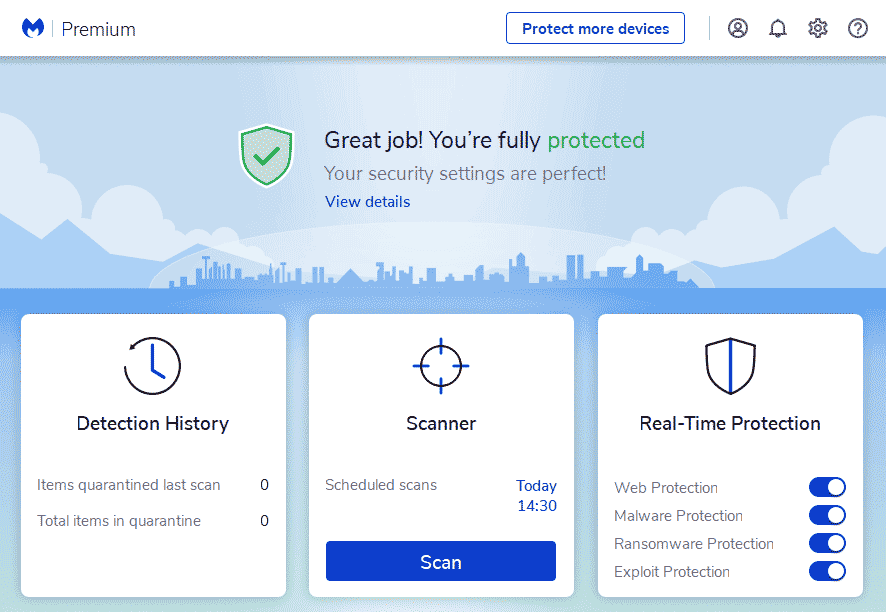
Malwarebytes Premium is a light, easy-to-use antivirus package that provides users with round-the-clock protection from a wide range of e-threats. The user interface is well thought out and simple to navigate.
Security Functions of Malwarebytes
Malwarebytes detects malware using a mark-based approach as well as heuristics. This implies that Malwarebytes has a malware database that it uses to identify malware on your system, and it also inspects documents for suspicious behaviour to identify new malware that hasn’t yet been added to its data set.
Malwarebytes offers four distinct infection checks that you can browse:
- Scan for danger: Examine critical areas of your device’s framework, memory, and startup programs.
- Quick Scan: Filters dynamic contaminations from your memory and startup programs.
- Scan to order: Filters any document or organizer that you require (counting the whole circle).
- Scan a single file/folder: Investigates a single document
It’s very important to note that Malwarebytes doesn’t have a default full framework filter option, so if you want to scan your entire system for malware, use the Custom Scan option and select the options in general.
Is Malwarebytes secure?
Malwarebytes is a secure antivirus management tool. Their advanced infection detection methods and a few security features protect against a wide range of online threats. All things considered, it lacks a coordinated firewall. Furthermore, the free version only includes malware filters, and different highlights are locked behind a firewall.
It’s worth noting that Malwarebytes was recently targeted by a cyberattack. A portion of their messages was intercepted by the same assailants responsible for the SolarWinds hack. A portion of their internal messages was revealed in this manner. Overall, there is no evidence that any client information was compromised.
All things considered, you don’t need your PC to become a guinea pig – testing labs are for that. The organization chose to participate in AV testing in 2018, and its results have improved since then.
Although advanced users will appreciate this, I believe Malwarebytes should make it clear to less technically-savvy users that the best way to examine the entire device is with a Custom Scan of the entire plate.
Key Features
Constant Defense
Malwarebytes’ continuous security (available only on paid plans) includes four distinct layers of assurance:
- Web security.
- Malware and PUP removal.
- Ransomware defense.
- Use protection to your advantage.
This is a fantastic result that is comparable to most premium antiviruses. Malwarebytes’ web insurance was also extremely effective at obstructing phishing sites, recognizing roughly 90% of the known phishing locales I attempted to visit.
However, Malwarebytes’ ransomware insurance isn’t comparable to the following standard security. I used a ransomware test system to see if Malwarebytes could detect and prevent ransomware, and Malwarebytes blocked roughly 66 percent of the ransomware documents on my device. All ransomware recreations were immediately stopped when I used a similar test system on Norton, McAfee, and Bitdefender.
Browser Guard
Browser Guard by Malwarebytes is a free program that enhances Google Chrome, Edge, and Firefox. The augmentation protects against malware, advertisements and trackers, tricks, and PUPs.
Program Guard is extremely simple to use because all of the assurances are enabled by default. If you need to turn off specific layers of security – for example, if you know a site is secure but the augmentation is preventing you from entering the site – you can easily toggle every insurance on or off.+.
VPN (Virtual Private Network)
The Malwarebytes Premium + Privacy plan includes a VPN and includes over 300 servers spread across 30 countries. This is a lot of server areas for a VPN that comes with an antivirus – Norton and TotalAV both have about 30 server areas, while VIPRE’s VPN has around 80.
WireGuard protocol
This is one of the quickest and most secure protocols available from many independent VPNs, including ExpressVPN and CyberGhost VPN. Strict no-logs policy. Malwarebytes does not log or store client data, such as browsing history or association logs.
The Malwarebytes VPN does not have an off button
If your VPN connection fails, an off button will terminate your web connection. This is a significant VPN feature, and antivirus competitors like Bitdefender and Kaspersky both have an off button for their VPNs, so this is something I’d really like to see Malwarebytes remember for its VPN as well.
Malwarebytes’ VPN has fast speeds. To assess its performance, I first ran a speed test without the VPN, and then I ran another test while connected to a nearby US server (I’m in Canada). I also tested the VPN’s speed while connected to long-range servers.
Exploit Protection
Despite being remembered for the Real-Time Protection list, the Exploit Protection highlight deserves its own section. This is because this is a high-level security strategy that deals with exploit attacks against security flaws and programming flaws in applications.
These types of attacks are much more subtle than standard infections, as they only require you to open a contaminated page or file. Malwarebytes Premium, fortunately, looks after you: it “protects” vulnerable applications so that malicious code cannot exploit their security flaws.
Framework check modes
There are three framework check modes: Quick sweep, Custom output, and the Threat filter. Malwarebytes appears to have adapted to the market by changing some of its checking titles to more recognizable ones.
Keep in mind that Malwarebytes can run each type of output sequentially. You can’t, for example, run a framework output and then look at a specific record for antiviruses. Along these lines, plan them similarly.
Free Version
Malwarebytes antivirus comes in three flavors: Free, Premium, and Premium plus privacy. Let’s look into how they differ. Malwarebytes Free includes only the malware scanner and the Browser Guard augmentation. I only recommend this arrangement to clients who are looking for a quick way to remove a current malware infection from their device.
If you require 24-hour security, Malwarebytes Free is insufficient because it lacks continuous protection. While most free antiviruses aren’t particularly good, there are some contenders, for example, Avira Free, that incorporate both continuous malware protection and extra components, for example, framework tuneup devices and a VPN. So, if you need a free antivirus, there are better options.
However, if you’re willing to spend some money on an antivirus suite, Malwarebytes Premium is a good option for clients looking for a powerful antivirus scanner. Furthermore, Malwarebytes Free includes a 14-day free trial of Malwarebytes Premium, allowing you to test all of the top-notch highlights risk-free.
Premium Version
The Malwarebytes Premium version includes malware detection, continuous protection, and the Browser Guard expansion. You can conceal 5 devices with this arrangement, including Windows, Mac, Android, and iOS.
The constant assurance alone justifies the upgrade from Free to Premium. With continuous insurance, you get additional layers of protection against online scams, phishing, ransomware, PUPs, and attacks that exploit bugs and weaknesses in your device’s security.
While Malwarebytes Premium isn’t as good as the best antivirus programming in 2022, it’s a good option for clients looking for a simple yet effective web security arrangement. Malwarebytes provides a 60-day unconditional guarantee.
Malwarebytes Premium + Privacy
Malwarebytes’ most expensive arrangement incorporates all of the elements of its Premium arrangement as well as a VPN. This is a good option for clients who want to combine Malwarebytes’ solid antivirus and phishing protection with a quick and dependable VPN. In any case, Malwarebytes’ VPN does not support streaming, torrenting, or working in countries with web restrictions.
In general, Malwarebytes Premium + Privacy is rated on a similar level to many of the top antivirus contenders, but it does not offer as many features. For example, Norton 360 Standard is less expensive than Malwarebytes, and Norton includes continuous malware assurance, web security, a firewall, a secret key director, data fraud insurance, and distributed storage. Bitdefender Total Security is also less expensive than Malwarebytes, and Bitdefender provides more additional features than most other brands. The one area where Malwarebytes excels, where the others fall short, is its ease of use. Its simple layout makes it a perfect fit for new users.
What is it like to use Malwarebytes?
Because Malwarebytes is so fundamental, you’d think it would have no effect on the appearance of your PC. Unfortunately, that is not the case. The test labs discovered that it reduced the speed of normal tasks by 9.1 percent on average.
This is better than Windows Defender, which dragged the framework down to around 12.5 percent. Nonetheless, there are many snappier alternatives, with F-Secure SAFE causing only a 6.1 percent lull.
Malwarebytes Browser
The free browser extension for Google Chrome, Firefox, and Microsoft Edge, blocks advertisements and protects you from third-party trackers, malware, tricks, and PUPs (potentially unwanted programs, e.g. spyware, adware, etc).
Noxious Website Protection Malwarebytes includes the Malicious Website Protection component to help you avoid visiting trick and phishing sites. Furthermore, it prevents the installation of malware or potentially unwanted programs (PUPs) on your device.
This useful component is also known as URL sifting, and it works in a straightforward manner: it naturally checks and squares both harmful spaces and IP addresses by blocking relevant DNS inquiries. Remember that the Malicious Website Protection feature is only available to Premium Malwarebytes members.
Isolated data
When Malwarebytes antivirus detects a contaminated file on your device, it immediately kills it by placing it in the quarantine area. Regardless, if you are certain that the record is secure and that the issue is a phony one, you can reestablish it and return it to its original location. You could add the record to the Allow list. Malwarebytes will then stop targeting it in future sweeps.
Privacy
A VPN is included in the Malwarebytes Premium + Privacy plan. It’s truly one of the best VPN and antivirus bundles available. The service covers 34 countries and has 400 servers, which is a little on the low side when compared to dedicated VPN providers. In any case, there should be a lot of places to connect with.
The VPN incorporates the WireGuard tunneling protocol, which is very popular right now among VPN administrations. Given that not all dedicated VPN specialist organizations have it, this is a significant accomplishment for Malwarebytes.
Furthermore, their connection will be protected by 256-cycle encryption. This implies that no programmer will want to use it for animal power. Furthermore, Malwarebytes employs a strict no-logs strategy, which results in no secondary access to your data.
Plan Features and Price
Malwarebytes $0.00 for free virus scans Virus detection, continuous insurance, ransomware prevention, and exploit protection Premium + Privacy for $29.99/year Virus detection, continuous assurance, ransomware mitigation, exploit security, and VPN $59.98/year
Trial
When your 14-day Premium trial period expires, you will be left with the free version of Malwarebytes antivirus. Is there any advantage? Indeed, everything it does is check your device and remove any existing dangers.
As a result, it requires one of the most important aspects of any antivirus program – continuous assurance. That implies you require another antivirus solution to protect you while browsing the web or carrying out your regular tasks.
Obviously, Malwarebytes Free is a good option if your PC is infected. Furthermore, we should get genuine – most free antivirus programs do not provide continuous security, so we shouldn’t be too harsh on Malwarebytes.
In any case, I might want to see even more free highlights from now on. If not, Malwarebytes will most likely succumb to the opposition.
Last Word on Malwarebytes Premium
Malwarebytes Premium worthwhile purchase for those who are looking for a solid solution to keep malware at bay. You go through it during your 14-day trial period. After a while, you should consider purchasing a yearly membership if you require the program to continuously protect your device.
This version incorporates everything covered in this Malwarebytes audit: the various types of sweeps (including the daily Threat check), all Real-Time Protection highlights (Web, Malware, Ransomware, Exploit), and the possibility to get Device Alerts that warn you about security issues with gadgets.
Malwarebytes Premium currently has a rebate – it costs $29.99 per year. It only supports one device and is available for Windows, iOS, Android, macOS, and Chrome devices.